How to Create a QR Menu Without a Designer
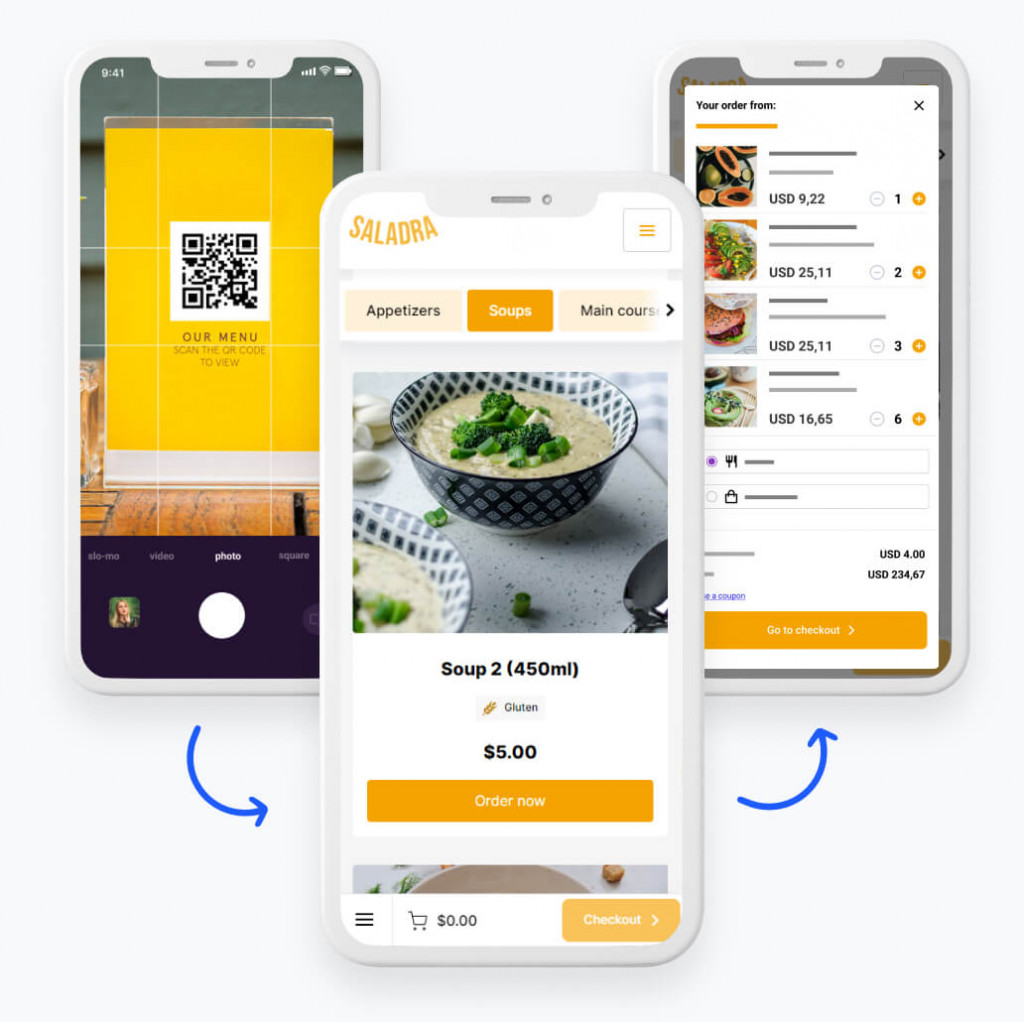
Introduction: You Don’t Need a Designer to Build a Good QR Menu
Many restaurant owners believe they need a graphic designer to create a professional-looking QR menu. In reality, that’s no longer true. Today’s digital tools make it possible to build a no designer restaurant menu that looks clean, works smoothly, and customers actually enjoy using—especially once you understand what a QR menu is and how it works.
If your goal is speed, clarity, and usability—not flashy design—then a simple QR menu is often the best solution. This guide walks you step by step through creating a QR menu without a designer, without special software skills, and without wasting time or money.
What Is a “No Designer” Restaurant Menu?
A no designer restaurant menu is a digital menu created using:
- Ready-made templates
- Simple editing tools
- Text, prices, and optional photos
Instead of custom layouts and graphic work, the focus is on usability, readability, and speed—an approach that aligns well with the free vs paid QR menu tools: what’s the difference.
Why Simple QR Menus Often Work Better
Overdesigned menus frequently cause problems:
- Slow loading
- Tiny text
- Confusing layouts
A simple QR menu avoids these issues by prioritizing:
- Clear categories
- Easy scrolling
- Fast performance
For most restaurants, simplicity leads to better customer adoption, reduced errors, and enhanced user experiences, as discussed in how QR menus help prevent menu errors.
Step 1: Choose a Simple QR Menu Tool
Start with a tool that’s built for non-designers.
What to Look For
- Drag-and-drop or form-based editing
- Mobile-first templates
- No coding required
- Instant QR code generation
If the tool feels complicated, it defeats the purpose of a no designer restaurant menu—especially for teams with limited time or staff, like those covered in how to create QR code menu.
Step 2: Organize Your Menu Content First
Before opening any tool, prepare your content.
Create a Simple Structure
- Starters
- Mains
- Drinks
- Desserts
Under each category, list:
- Item name
- Short description (optional)
- Price
Clear structure is more important than visual styling. By ensuring a straightforward layout, it’s easier for customers to navigate quickly, enhancing their experience while minimising confusion, which is essential when considering the benefits of digital menus as highlighted in how QR menus increase average order value.
Step 3: Use Built-In Templates (Don’t Customize Too Much)
Most QR menu tools provide templates—and that’s a good thing.
Why Templates Work
- Designed for mobile screens
- Tested for usability
- Consistent spacing and fonts
Avoid the temptation to over-customize. Templates are what make a simple QR menu effective without a designer, maintaining good design principles while offering ease-of-use.
Step 4: Keep Text Short and Readable
Text-heavy menus are hard to scan on phones.
Best Practices
- One-line descriptions when possible
- Simple language
- No marketing fluff
Readable text is the foundation of a strong no designer restaurant menu. The clarity in text not only speeds up the decision-making process for customers but also enhances their overall experience.
Step 5: Use Photos Sparingly (or Skip Them)
Photos are optional—not required.
If You Use Photos
- Add only to bestsellers
- Use real photos, not stock
- Compress images for speed
Many successful simple QR menus use no photos at all and still perform well, emphasizing the importance of clear navigation over visual elements.
Step 6: Preview on Your Phone (This Is Critical)
Never design your menu only on a computer.
Always Test
- On multiple phone sizes
- In low lighting
- With one hand (thumb scrolling)
If it feels easy on your phone, customers will feel the same. Testing on actual devices provides crucial insights that can affect customer satisfaction and ease of use.
Step 7: Generate and Test Your QR Code
Once your menu is ready, generate the QR code.
Testing Checklist
- Scans quickly
- Opens without an app
- Loads in under 3 seconds
- Displays correctly on all devices
A broken QR code ruins even the best no designer restaurant menu, negating all the effort put into its creation. Therefore, thorough testing is essential to guarantee a seamless experience.
Step 8: Print and Display Simply
You don’t need fancy materials to start.
Good Starter Options
- Laminated paper
- Simple table tents
- Stickers on menu holders
Clear instructions like “Scan to View Menu” increase usage. Ensuring customers know how to access the menu is a critical step in adopting QR technology effectively, as explored in how to print and display QR codes on tables.
Common Mistakes to Avoid
Avoid these pitfalls when creating a simple QR menu:
- Tiny fonts
- Too many categories
- Over-customized colors
- Long descriptions
- Forgetting to test on real phones
Most problems come from trying to “design” too much. Remember to keep it simple, focusing on efficiency and usability at all costs.
Why No-Designer QR Menus Save Money
A no designer restaurant menu saves on:
- Graphic design fees
- Reprinting costs
- Redesign time
More importantly, it lets you update prices and items instantly—without waiting on anyone else. This agility in updating content can be a game changer, especially during fluctuating market conditions.
When You Might Eventually Need a Designer
You may consider a designer later if:
- You’re building a strong brand identity
- You want a custom visual experience
- You run a high-end or concept-driven restaurant
But for most restaurants, a simple QR menu is more than enough. By focusing on essential functionalities rather than aesthetics, you can create an effective QR solution without the need for extensive design work.
FAQs About Creating QR Menus Without a Designer
- Can I really make a QR menu without design skills? Yes. Most tools are built specifically for non-designers.
- Will a simple QR menu look unprofessional? No. Clean, readable menus often look more professional.
- Do I need photos for my QR menu? No. Photos are optional.
- How long does it take to create a simple QR menu? Often less than 30 minutes.
- Can I update the menu myself later? Yes. That’s one of the biggest benefits.
- Should I still offer printed menus? Yes, as a backup and accessibility option.
Conclusion: Simplicity Beats Design
You don’t need a designer to create a QR menu customers actually use. A no designer restaurant menu built with clarity, speed, and simplicity will outperform a complicated, over-designed one every time. By focusing on usability and choosing the right tools, you can create a simple QR menu that saves money, reduces friction, and works seamlessly for both customers and staff while also benefiting from the efficiencies discussed in how QR menus speed up table turnover and the flexibility offered in QR code menu vs. printed menu: cost, speed, and flexibility.