How to Add Photos to Your Menu Without Printing Costs
Introduction: Why Menu Photos Matter More Than Ever
Food photos sell. Customers are far more likely to order a dish when they can see it first. But printing menus with images is expensive, hard to update, and quickly outdated. That’s why many restaurants are searching for practical ways to add visuals without increasing costs.
This is where How to Add Photos to Your Menu Without Printing Costs becomes a game-changer. By using digital solutions, restaurants can showcase appealing restaurant menu photos and digital menu images without redesigning or reprinting menus every time something changes. Understanding contactless QR code menus – why restaurants still use them helps explain why this shift toward digital visuals has become so effective.
In this article, you’ll learn exactly how restaurants add photos to menus affordably, efficiently, and professionally.
The Problem With Printed Menu Photos
Printed menus with photos come with several challenges, which can hinder a restaurant's ability to effectively market its offerings:
- High printing and design costs: Printing quality images can be pricey, and redesigns can lead to significant expenses.
- Limited space for images: A traditional printed menu typically provides limited space for visuals, hampering the ability to effectively highlight all dishes.
- Difficult to update or replace photos: When dishes change or seasonal items are added, changing printed menus can be a cumbersome process.
- Waste when menus change: Newly printed menus often lead to waste when old menus are discarded.
- Poor image quality after wear and tear: Over time, printed photos can fade or become damaged, leading to a less appealing product.
Once printed, photos are locked in—even if dishes change or improve, rendering them less effective.
Why Digital Menu Images Are the Better Solution
Digital menus allow restaurants to add, remove, or update photos instantly. Instead of paying for reprints, you update images online and customers see them immediately. This convenience and efficiency are what make modern dining experiences more interactive and engaging.
This is the core advantage behind How to Add Photos to Your Menu Without Printing Costs—flexibility without recurring expenses. Restaurant owners can utilize digital platforms to keep their offerings current while enhancing the dining experience. For instance, you can explore the QR code menu vs printed menu: cost, speed, and flexibility to understand why many are making the switch.
Ways to Add Photos Without Printing Costs
1. Use a QR Code Menu
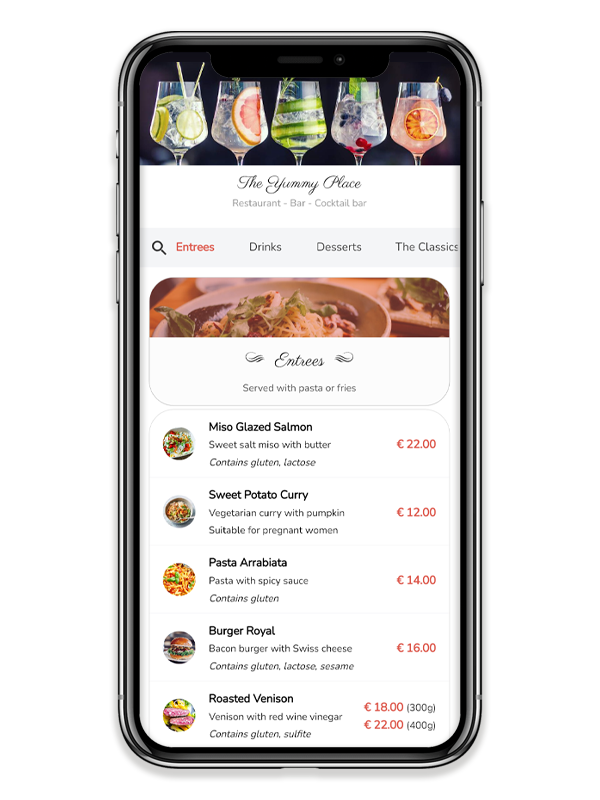
QR code menus are one of the easiest and most versatile ways to add photos to menus.
How it works:
- Customers scan a QR code.
- The menu opens on their phone.
- Photos appear next to menu items.
With QR menus, digital menu images can be updated anytime without changing the QR code itself. Many restaurants start by learning how to how restaurants update menus instantly without reprinting to unlock this flexibility and enhance customer engagement.
2. Add Photos to Your Website Menu
If your restaurant has a website, adding photos to menu pages is simple and effective.
Benefits:
- Central place for updates.
- Works on all devices.
- No printing costs.
Website menus are ideal for showcasing high-quality restaurant menu photos that reflect your brand and its values. This method not only allows guests to browse dishes before their visit but also helps improve online visibility, attracting more diners to your venue.
3. Use Digital Menu Platforms
Many restaurants use dedicated menu platforms that support images, which can streamline the process significantly.
What these platforms offer:
- Easy photo uploads.
- Category-based layouts for better organization.
- Mobile-friendly design for ease of use.
- Fast updates that keep your menu fresh and inviting.
This method supports How to Add Photos to Your Menu Without Printing Costs while keeping everything organized, which is especially helpful for how QR menus help prevent menu errors. It can be a win-win situation, maximizing efficiency without compromising on quality.
4. Tabletop Displays and Screens
Some restaurants have started to utilize small digital screens or tablets at tables or counters, creating an interactive experience for their customers.
Advantages:
- High visual impact that captures customer attention.
- Ability to rotate images or feature specific dishes.
- No printing required, which contributes to reduced overhead.
While this option involves hardware costs, it eliminates ongoing printing expenses, making it a worthwhile investment for many establishments.
Best Practices for Restaurant Menu Photos
Adding photos is beneficial—but only if done right. Here are some best practices to follow:
Use High-Quality Images
Blurry or dark photos can hurt customer trust and interest. Use well-lit, clean images that accurately match the actual dish and its presentation.
Be Selective
You don’t need photos for every item on your menu. Highlight bestsellers and signature dishes that define your culinary style, while also considering seasonal specialties you can promote.
Keep Photos Accurate
Photos should reflect real portions and presentation. Misleading images can lead to disappointment, frustrating customers when their order does not meet their expectations.
Optimize for Mobile
Since most digital menus are viewed on phones, images should load quickly and fit small screens properly, ensuring a smooth browsing experience.
Common Mistakes to Avoid
When adding restaurant menu photos, be mindful of these common pitfalls:
- Overloading the menu with too many images can detract from the overall effect.
- Utilizing stock photos that don’t match your food can create a disconnect with patrons.
- Slow-loading images can frustrate users, leading to potential lost orders.
- Inconsistent photo styles can confuse customers and lower brand recognition.
Avoiding these mistakes improves usability and nurtures trust in your brand.
Cost Comparison: Printing vs Digital Photos
| Feature | Printed Menu Photos | Digital Menu Images |
|---|---|---|
| Update Cost | High | Low |
| Flexibility | Very limited | Very high |
| Speed of Change | Slow | Instant |
| Sustainability | Paper waste | Eco-friendly |
| Long-Term Cost | Expensive | Affordable |
This comparison shows why digital solutions are the smartest way to add photos to menus. Digital formats not only save costs but also support sustainability principles that are increasingly important to today’s customers.
How Often Should You Update Menu Photos?
You should regularly update digital menu images when:
- A dish presentation changes to reflect new culinary techniques.
- New items are added to keep your offerings current.
- Seasonal menus launch to encourage excitement around new flavors.
- Photo quality improves, ensuring your visual representation always looks its best.
Because updates are digital, there’s no penalty for keeping photos fresh. Many restaurants follow a complete QR menu setup checklist for restaurants to ensure images remain accurate and consistent.
FAQs About Adding Photos Without Printing Costs
- Can I add photos without changing my printed menu? Yes. Digital menus and QR menus allow you to add photos without the hassle of reprinting.
- Do menu photos slow down the ordering process? No, when optimized properly, photos actually help customers decide faster, enhancing the overall dining experience.
- Are professional photos required? Not always, but good lighting and clear images are essential for making a great impression.
- Can small restaurants use digital menu images? Absolutely. Digital menus are adaptable and work for restaurants of all sizes, promoting efficiency without the extensive costs of traditional methods.
- Should every menu item have a photo? No. Focusing on popular or high-margin dishes can be more effective and appealing.
- Are digital menu images expensive to maintain? No, once they are set up, updates are generally low-cost or even free.
Conclusion: Visual Menus Without Extra Costs
Learning How to Add Photos to Your Menu Without Printing Costs gives restaurants a powerful advantage in today’s competitive market. Digital tools make it easy to showcase food, attract attention, and enhance customer decisions—without ongoing printing expenses.
By using QR menus, well-maintained websites, or dedicated digital platforms, restaurants can seamlessly incorporate stunning restaurant menu photos and digital menu images while staying flexible, accurate, and cost-efficient. In today’s dining world, visual menus don’t need to be expensive—just smart. Make the transition to digital menus and witness the profound impact on your restaurant’s success and customer satisfaction, ensuring you never miss the opportunity to present your dishes in their best light.