Last-Minute Menu Changes: What Actually Works
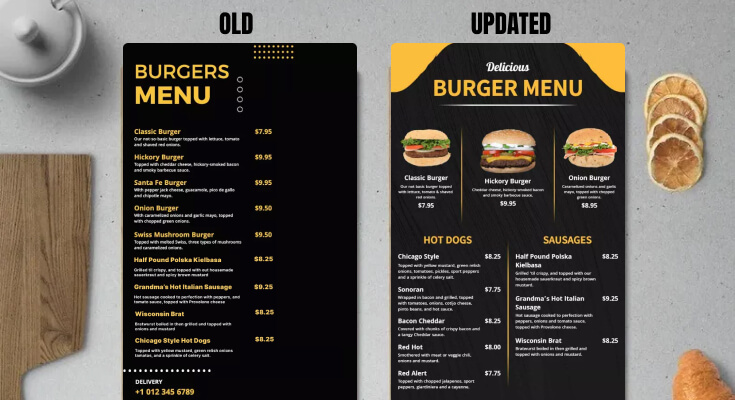
Introduction: When Menu Changes Can’t Wait
Every restaurant faces moments when the menu must change immediately. An ingredient runs out, a delivery doesn’t arrive, equipment fails, or demand spikes unexpectedly. In these moments, last minute menu changes aren’t optional—they’re critical to maintaining customer satisfaction and operational flow.
The problem is that rushed updates often lead to confusion, wrong orders, and frustrated guests. That’s why restaurants need systems that support emergency menu updates without slowing service or overwhelming staff—most commonly through tools built on what a QR menu is and how it works in real service.
This article breaks down what actually works when menu changes need to happen at the last possible moment—and what doesn’t.
Why Last-Minute Menu Changes Happen
Even the best planning can’t prevent surprises. Last-minute menu changes can arise from a myriad of situations, and understanding these causes is crucial for effective management. Common reasons include:
- Ingredients selling out faster than expected
- Supplier delays or shortages
- Equipment breakdowns
- Sudden price changes
- Popular specials running out early
The key isn’t avoiding change—it’s managing it cleanly and efficiently to minimize the impact on customers and staff.
Why Last-Minute Menu Changes Are So Risky
When last minute menu changes are handled poorly, problems can escalate quickly:
- Customers order unavailable items, leading to disappointment
- Staff members give conflicting answers about what is still available
- Prices on menus don’t match the final bill, creating confusion
- Orders must be corrected or refunded, impacting service efficiency
- Service slows down during peak hours, frustrating both customers and staff
In emergency situations, every small mistake can amplify the chaos.
What Actually Works for Emergency Menu Updates
1. Digital Menus With Live Updates
The most effective solution for emergency menu updates is a digital menu that can be edited instantly.
Why This Works
- Changes appear immediately across all devices
- Old information disappears everywhere, preventing confusion
- Staff don’t need to explain changes repeatedly to guests
Restaurants that set up their menus correctly from the start—using a structured approach like a complete QR menu setup checklist for restaurants—handle emergencies far more smoothly.
2. Remove Items Completely (Don’t Just Explain Them Away)
One of the biggest mistakes restaurants make is leaving sold-out items visible and relying on staff to explain the situation.
What Works Better
- Remove the item instantly, maintaining a current menu
- Hide unavailable options so customers can't accidentally choose them
- Prevent customers from ordering items that are not available
This proactive approach reduces customer frustration and speeds up decisions during last minute menu changes.
3. Assign One Person to Handle Updates
Emergency situations require clear ownership and responsibility.
Best Practice
- One manager or lead should control updates to ensure consistency
- Avoid multiple edits from various staff members to prevent confusion
- Establish a clear chain of decision-making for swift adjustments
This prevents conflicting information during high-pressure moments, allowing everyone to stay aligned.
4. Keep Emergency Messages Simple
When time is tight, clarity beats detail in communication.
Effective Messaging Examples
- “Sold Out Today” clearly indicates the item is no longer available
- “Unavailable Due to Supply” conveys transparency about sourcing issues
- “Limited Quantity Remaining” creates urgency without confusion
Avoid long explanations—simple labels work best to ensure understanding and efficiency during peak times.
5. Update the Menu Before Telling Staff
Always update the menu first to avoid cascading miscommunications.
Correct Sequence
- Make the digital update to ensure information is current
- Confirm it’s live and accessible for both customers and staff
- Brief staff quickly about the changes they need to know
This sequence is easiest when teams already know how to update menus across multiple devices instantly, ensuring everyone is on the same page before service continues.
6. Use Visual Cues Instead of Verbal Explanations
Visual signals can significantly reduce staff workload during busy service times.
Helpful Visual Cues
- Grayed-out items on the digital menu indicate they are unavailable
- “Sold Out” tags clearly display which items cannot be ordered
- Highlighted alternatives suggest popular options available in place of sold-out items
This visual clarity prevents repeated questions from customers while speeding up the service process.
7. Offer Automatic Alternatives
When an item disappears, customers need guidance to make alternative choices swiftly.
What Works
- Proactively suggest similar dishes that can satisfy the same cravings
- Highlight popular substitutes that are readily available
- Promote items with available inventory through engaging descriptions
This keeps orders moving even during last minute menu changes and enhances the overall dining experience.
What Does NOT Work (But Restaurants Still Try)
Avoid these outdated and ineffective approaches to managing menu updates:
- Sticky notes on menus that can easily be overlooked
- Verbal-only explanations that create confusion among staff
- Handwritten signs mid-service that lack professionalism
- Asking staff to “remember” changes instead of documenting them properly
- Waiting until the rush is over to address shortages, which creates chaos
These approaches ultimately increase errors and elevate stress levels for both staff and guests alike.
Emergency Menu Updates vs Traditional Methods
| Situation | Traditional Menus | Emergency Menu Updates |
|---|---|---|
| Sold-out item | Verbal apology | Instant removal |
| Price change | Delayed | Immediate |
| Staff confusion | High | Low |
| Customer frustration | Common | Reduced |
| Peak-hour control | Weak | Strong |
This comparison highlights the significant advantages of digital solutions and underscores why swift updates and easy accessibility are essential for restaurant success.
How to Prepare for Last-Minute Menu Changes
Preparation is key to reducing panic during a crisis. Ensuring readiness before service begins creates a stable environment.
Before Service
- Proactively identify low-stock items that may cause issues
- Prepare alternative suggestions to recommend to customers
- Assign an individual update responsibility to ensure accuracy
- Ensure menu access works properly across all devices to avoid delays
With proper preparation, last minute menu changes become manageable and organized rather than chaotic and stressful.
Best Restaurants for Emergency Menu Updates
These types of restaurants benefit most from having streamlined systems in place:
- High-volume locations that deal with a large influx of customers
- Bars and pubs, where inventory can turn over rapidly
- Cafés with limited prep time that need to adapt on the fly
- Tourist-area restaurants that see unexpected fluctuations in demand
- Short-staffed teams that require efficient communication and updates
In settings where unpredictability exists, fast updates are essential for maintaining service quality.
Staff Communication During Emergencies
Keep staff communication concise:
- Maintain brevity for efficiency
- Stress clarity in instructions
- Focus on action to keep service flowing
Example:
“Fish taco sold out—removed from the menu and suggested chicken wrap.” This keeps everything moving smoothly.
FAQs About Last-Minute Menu Changes
- Are last minute menu changes unavoidable? Yes, supply and demand change constantly in the food industry.
- What’s the fastest way to handle emergency menu updates? Live digital menu updates are the quickest solution.
- Should staff explain menu changes verbally? Only briefly—the menu itself should handle most of the communication.
- Are price changes risky during emergencies? Yes, but instant updates from your digital menu minimize potential confusion.
- Can small restaurants manage last-minute changes effectively? Yes, digital menus help small teams the most in adapting to sudden changes.
- Should restaurants wait until service ends to update menus? No. Waiting creates more confusion and can lead to errors.
Conclusion: Speed and Clarity Win Every Time
Last minute menu changes don’t have to cause chaos. When restaurants rely on fast, clear emergency menu updates, they protect both service quality and customer trust. The need for real-time adjustments has never been more critical in today's dining environment.
What actually works is simple: instant updates, clear ownership, visual clarity, and minimal explanation. When menus update in real time and staff stay aligned—particularly alongside proven strategies for managing menu changes during peak hours—even last-minute changes can feel controlled.
Additionally, learn how QR menus help prevent common menu errors and discover their advantages over traditional formats in terms of cost, speed, and flexibility by exploring our detailed guide on QR code menu vs printed menu. Utilizing these strategies ensures that, in modern restaurants, flexibility isn’t just a luxury—it’s essential for survival.